

Compliance
Demonstrably in order, per building and per system.
Upload existing reports in bulk. Naxerio recognizes what's in them and puts a proposal to you for review. You then see per building what you can prove, what expires and what is missing.

Can we show we're in order, and what is missing?
Prepare for an audit
Export the overview with all linked evidence per category. What used to take days of searching is ready in one file.
Hand over a building
The next property manager sees straight away what is there, what expires and what still needs doing. No knowledge gets lost.
Know what applies
Per building, you see which categories are relevant and which documents belong to them.
What it gives you
Days of digging, gone
Existing inspection and survey reports are read in and proposed in one go, instead of document by document.
See what is missing
Per building and system, you see which evidence is there, which is missing and what expires soon.
Evidence ready for an audit
Every piece of data stays traceable to the source document, with its full history.
What's included
- Status per building, category and piece of evidence
- Certificates, inspections and reports linked to the right item
- A heads-up for missing, expired and soon-to-expire documents
- Exports for audits, insurers and changes of property manager
- AI document import: read in up to 50 documents at once and get a proposal
- A full audit trail of every change
- Recognized data stays traceable to its place in the source document
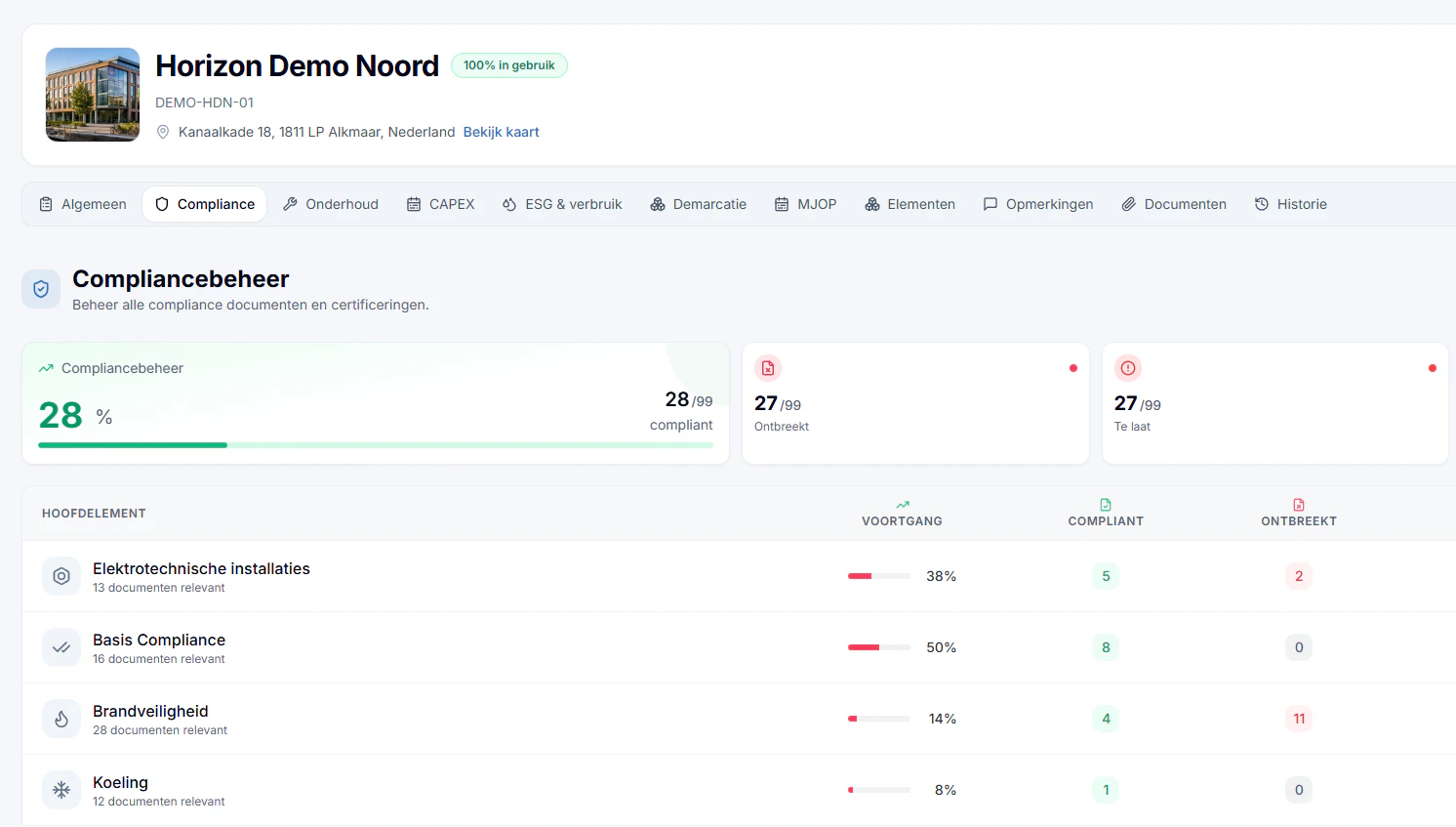
Real screenshot from Naxerio (Dutch interface), with demo data.
From a folder of reports to a complete overview.
Our AI reads every document in full: what kind of report it is, its date, how often it is required, who drew it up, and which system and obligation it belongs to. You review the proposal and confirm.
- Upload up to 50 documents at once, as PDF, Word or Excel.
- The AI reads the whole document and extracts the data that matters.
- You check every proposal with the source alongside. Only then is it recorded.
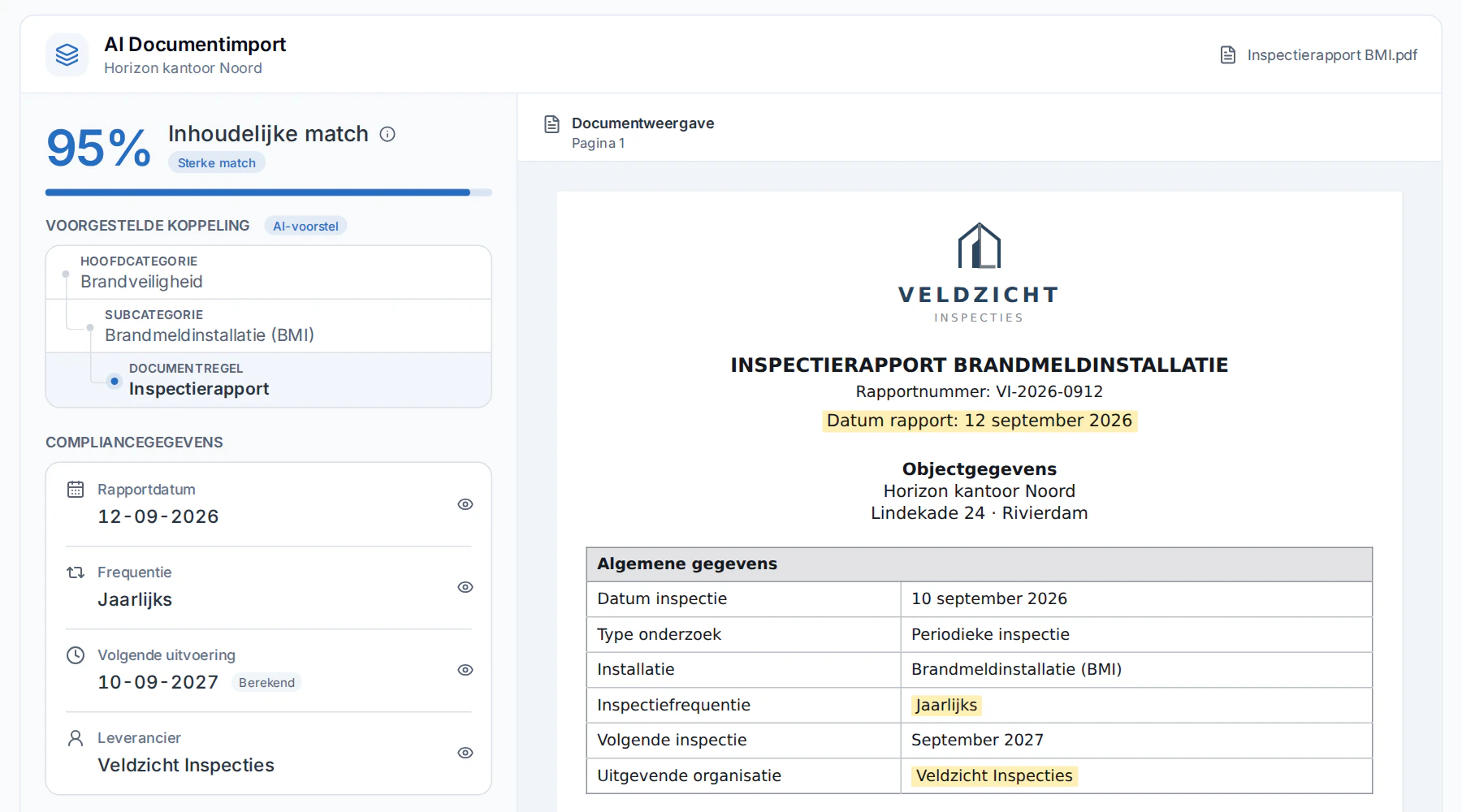
Real screenshot from Naxerio (Dutch interface), with demo data.
How it works
- 1
Upload
Existing inspection reports, certificates and other reports in bulk, up to 50 at a time, as PDF, Word or Excel.
- 2
Let Naxerio recognize them
Naxerio recognizes the document type, report date, frequency, party involved, system and matching document rule, and puts a proposal to you for review.
- 3
Show you're in order
Per category, you see what you can prove, what expires and what is missing.
- 4
Stay on top of it
You get a heads-up before a certificate expires, not after.


A folder of documents becomes a complete overview.
You upload the inspection reports and certificates you already have. Naxerio places them with the right building and category, and shows what is still missing.
Frequently asked questions
Which documents can I upload?
Inspection reports, certificates, maintenance reports and surveys, as PDF, Word or Excel. Up to 50 documents per import.
Do I have to sort everything myself?
No. Naxerio recognizes the data in each document and the matching document rule. You check it, with the document alongside, and only then is it recorded.
Can I show where a piece of data comes from?
Yes. Recognized data stays traceable to the source document. That helps with audits, and with owners, valuers and lenders.
Can I show that we're in order?
Yes. You export an overview per building or category with the linked evidence and its history.
PERSONAL DEMO
See your own building in Naxerio.
In a 30-minute demo, we look at one of your buildings together and at how Naxerio fits alongside the systems you already use. No sales pitch, just a clear picture.
Still exploring? Download the brochure